Beginner· Lesson 5 of 8· 3 min
Wallets, keys and addresses
A wallet is a keypair with a nice interface. Know what the key does and most of the scary parts stop being scary.
Keypairs
Every Solana account is identified by a public key: 32 bytes, shown as a base58 string of 32–44 characters. It is derived from a private key with the Ed25519 signature scheme. The public key is your address, safe to share. The private key produces signatures, and whoever holds it controls everything at that address.
A wallet app such as Phantom, Solflare, Backpack or a Ledger generates and stores private keys, shows balances and asks you to approve each transaction. It does not hold your funds; the ledger does. The wallet holds the key that can move them.
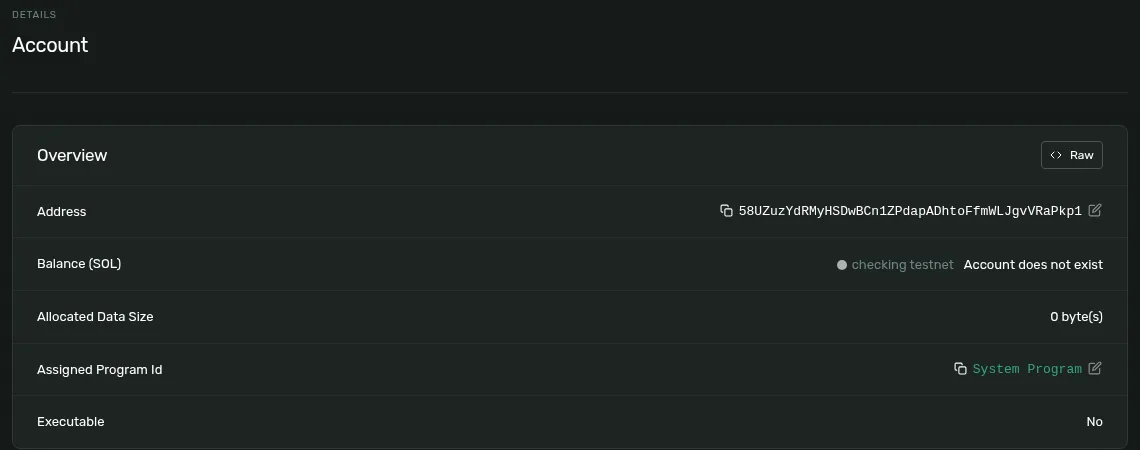
- A keypair generated for this lesson. The public key is a valid address the moment it exists. Nothing on-chain had to happen.
- But there is no account yet. One appears the first time lamports are sent here.
- A wallet address carries no data, before or after.
- Its owner will be the System Program: the program that moves SOL when you sign.
Seed phrases
The 12 or 24 words a wallet shows at setup are a seed phrase. From that seed the wallet derives as many keypairs as you like along a derivation path (Solana wallets use m/44'/501'/n'/0'). Restore the phrase in another wallet app and the same addresses come back. Three consequences:
- The phrase is the master key. Anyone who has it has every account derived from it, and no password on the wallet app can stop them.
- No website ever needs it. A site that asks for a seed phrase is a drainer, whatever it says on the button.
- Write it down offline. A screenshot in a cloud photo library is the most common way phrases leak.
What “connect wallet” actually does
Connecting gives the site your public key and permission to ask for signatures. The site cannot sign anything itself. Each transaction still arrives in the wallet as a popup you approve or reject, and modern wallets simulate it first so you can see what will change. That is the whole non-custodial model: the site builds and you sign. The non-custodial model walks through it.
Signing messages vs transactions
Wallets sign two kinds of thing. A transaction changes the ledger and costs a fee. A message is arbitrary bytes, used to prove you control an address, for example to log in or verify ownership, without touching the chain. A message signature cannot move funds, but read it anyway: a legitimate one is plain text you understand. Try both sides with Sign & Verify.
Hot, hardware and burner
| Hot wallet (browser, mobile) | The key lives on an internet-connected device. Convenient; hold only what you are actively using. |
|---|---|
| Hardware wallet | The key never leaves the device and each signature is confirmed on its screen. Use it for anything you would mind losing. |
| Burner | A fresh keypair with a little SOL for minting, testing or trying something unproven. If it is drained, nothing else is. |
Handling addresses
Base58 leaves out 0, O, I and l so characters can't be misread, but there is no checksum: a mistyped address is just a different address, and SOL sent there is gone. Paste, never type. Check the first and last four characters against the source. Never copy a recipient from your transaction history. Attackers send dust from look-alike addresses precisely so you will. Common Solana scam patterns covers the rest.
What to remember
- Your address is a public key. The private key, or the seed phrase that generates it, is the only thing that controls it.
- Connecting a wallet shares your address and lets a site request signatures. It never lets the site sign.
- No legitimate site asks for a seed phrase.
- Message signatures prove ownership and cannot move funds. Transaction signatures can.
- Hardware wallet for what matters, burner for what's unproven.
Try it
What each tool does: Sign & Verify a Solana Message · Solana Account Inspector