Tools · Launchpads
pump.fun Launcher: Launch a Coin With an Atomic First Buy
Launch a coin on pump.fun with your first buy in the same transaction as creation.
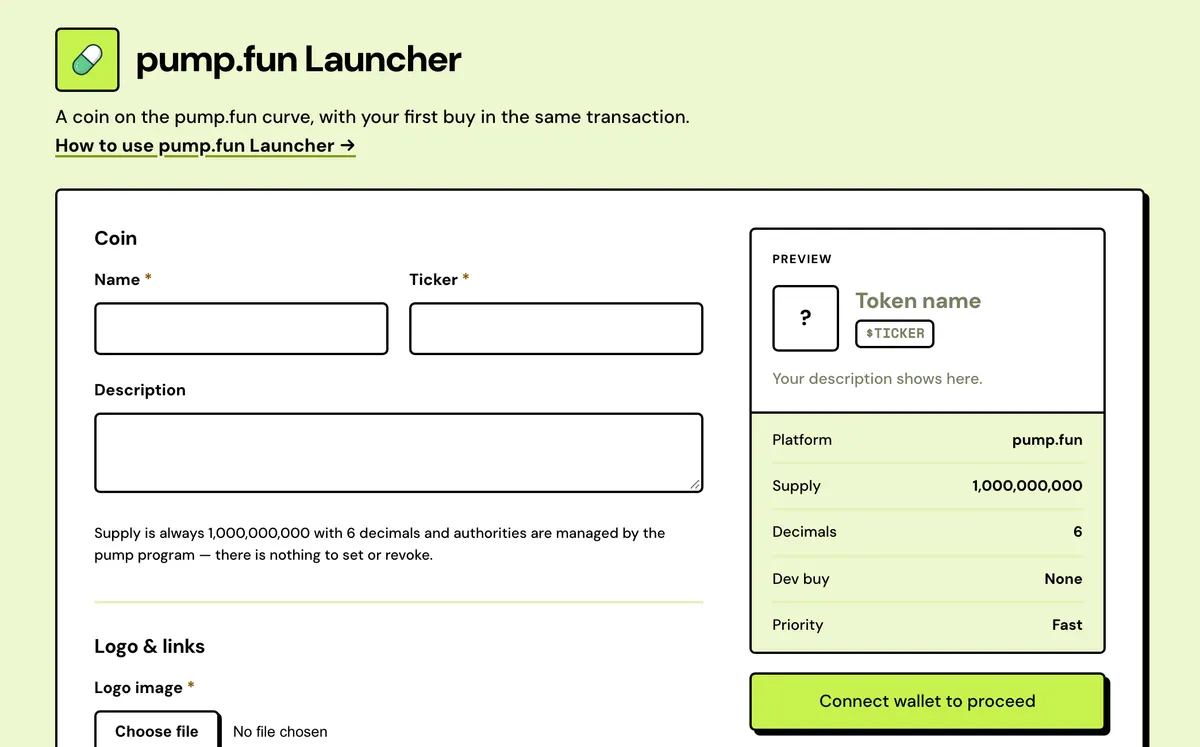
How to use the pump.fun Launcher
- Connect your wallet.
- Enter name, symbol, image and description.
- Set an optional first-buy amount.
- Review the fee and sign — the coin is live on pump.fun immediately.
- Create and buy together
- Capped dev buy
- Priority you choose
- Metadata pump.fun reads
- Custom mint address
- Fees tracked afterwards
FAQ
Why is the first buy in the same transaction?
It's atomic — nothing trades before you, one wallet, visible on-chain.
Can I use multiple wallets to hide supply?
No.
Does it work on devnet?
The program runs there; pump.fun's site doesn't list devnet coins.
Can I edit the coin after launch?
No. The name, ticker, logo and links are fixed once the coin is created.
What if pump.fun changes its program?
The launch fails its simulation before anything is signed. Use pump.fun directly in the meantime.
Where do my creator fees go?
Into your wallet's pump.fun creator vault, one vault for all your coins, which keeps filling after a coin migrates. Claim on pump.fun or in Creator Fees.
What exactly do I sign?
An Irys funding approval if the upload needs one, then a single transaction with the create, your buy and the 0.05 SOL fee.
Everything about the pump.fun LauncherFeatures in full, how it compares, costs and the complete guide
What the pump.fun Launcher does
Create and buy together
The create instruction, your dev buy and the 0.05 SOL fee go in one Solana transaction. If any part fails, none of it lands.
Capped dev buy
Your buy carries a slippage cap, 5% by default, so the most SOL it can spend is shown on the review before you sign.
Priority you choose
Normal adds no priority fee, Fast about 0.004 SOL and Turbo about 0.04 SOL, to help the launch land when the network is busy.
Metadata pump.fun reads
Name, ticker, logo, description and links are uploaded to Arweave in the format pump.fun's site and indexers expect.
Custom mint address
Choose up to 6 characters for the start or end of the coin's address. Your browser finds a match before you sign.
Fees tracked afterwards
The coin is saved to My Solana Tokens, and its creator vault shows in Creator Fees, ready to claim.
Solstack vs other pump.fun launchers
One wallet and one transaction, where pump.fun bundlers are built to buy from many wallets at once.
Solstack pump.fun Launcher
- Your dev buy comes from the one wallet that creates the coin and shows on-chain as the creator's buy
- Never asks for a private key; you approve the launch in your own wallet
- Create, buy and fee land in a single Solana transaction, with no tip to a block engine
- 0.05 SOL flat per launch, nothing taken from trades
Typical pump.fun bundler
- First buys are spread across extra wallets: up to 5, 16 or 20 in the tools compared
- Often take pasted private keys for the dev or buyer wallets
- Often send a Jito bundle with a tip you set on top
- Often 0.1 SOL per bundle, or a fee on bundle trades
pump.fun Launcher: Complete Guide
How this pump.fun launcher works
This is a direct front end for the pump.fun bonding-curve program — your browser builds and signs the same instructions the pump.fun site does, with one difference: your first buy is bundled into the same transaction as the launch, so nothing can trade ahead of you.
Set a name, symbol, image and description, decide how much SOL (if any) to spend on the first buy, and sign once.

What pump.fun decides for you
- Supply is always 1,000,000,000 tokens with 6 decimals.
- The pump.fun program holds mint and freeze authority, so there's nothing to revoke.
- Trading starts on the bonding curve straight away, and moves to an AMM pool when the curve completes.
- A share of trading fees builds up in your wallet's creator vault. Claim it on pump.fun or in Creator Fees.
Why the first buy is bundled
Create a coin in one transaction and buy in the next, and there's a gap in which a sniper bot can buy first, at a lower price. Here the create, your buy and the Solstack fee are one transaction. Solana runs a transaction in full or not at all, so nothing can land between them, and if any part fails nothing happens.
The buy comes from the one wallet that creates the coin and shows on-chain as the creator's buy. Solstack doesn't split buys across wallets to hide how much the creator holds.
Before you launch
- Get the name, ticker, a square logo and any links together first. They go to Arweave and can't be edited once the coin is live.
- Choose the dev buy, or leave it at zero.
- Hold the dev buy, the 0.05 SOL fee and some spare SOL for rent, the upload and the network fee. The review screen shows the total.
- Rehearse on devnet if you like. The program runs there, though pump.fun's site doesn't list devnet coins, and the Solana Devnet Faucet covers the cost.
Other ways to launch
For Raydium's curve, use the letsbonk.fun Launcher; for Meteora's, the Meteora DBC Launcher. If you want a token with a supply you choose and no curve at all, the SPL Token Creator makes one for 0.1 SOL.
Bonding-curve launchers compared
| Launcher | Supply | Moves to | Devnet |
|---|---|---|---|
| pump.fun | 1,000,000,000, 6 decimals | An AMM pool when the curve completes | Yes; pump.fun's site doesn't list devnet coins |
| letsbonk.fun / LaunchLab | 1,000,000,000, 6 decimals | A Raydium CPMM pool at 85 SOL raised | Yes, on Raydium's test platform |
| Meteora DBC | Set by the curve config | A Meteora DAMM v2 pool at the config's threshold | Yes, on a rehearsal config |
| StonkFun | 1,000,000,000, 6 decimals | A Raydium CPMM pool, raise sized to match 85 SOL | No, mainnet only |
Launch form limits
The same limits apply on every Solstack launcher.
| Field | Limit |
|---|---|
| Name | Up to 32 characters |
| Ticker | Up to 10 characters, upper-cased for you |
| Logo | Required: PNG, JPG, GIF or WebP up to 2 MB, or a hosted image URL |
| X, Telegram, website | Optional; full links starting with http:// or https:// |
| Dev buy | Any amount of SOL, or 0 to create only |
| Slippage | 0.1% to 50%, 5% by default |
| Priority fee | Normal (none), Fast (about 0.004 SOL, the default) or Turbo (about 0.04 SOL) |
| Custom address | Up to 6 characters at the start and 6 at the end |
What it costs
0.05 SOL flat, plus pump.fun's ~1% fee on the dev buy if you make one.