Tools · Create
Solana SPL Token Creator: Mint a Standard Token
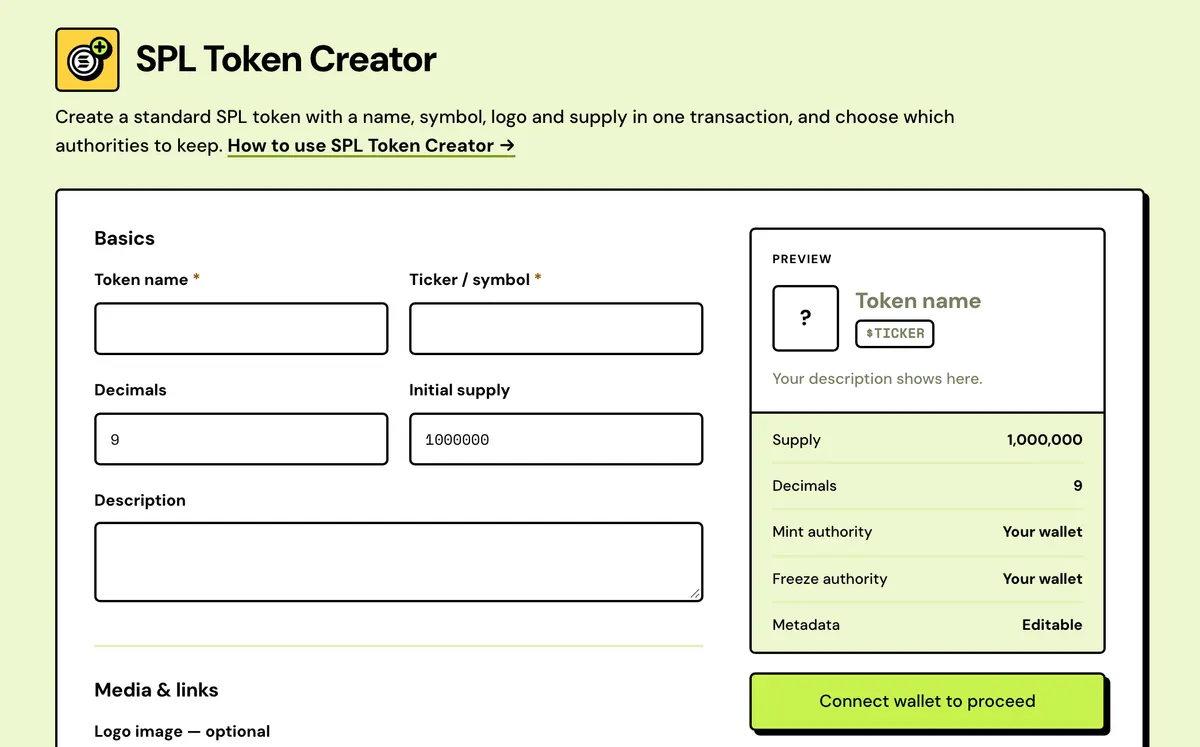
Mint a standard SPL token with name, symbol, decimals and a logo in one transaction, with optional authority revocation.
How to use the Solana Token Creator
- Connect your wallet.
- Enter a name, symbol, decimals and supply, and upload a logo.
- Choose whether to revoke mint and freeze authority.
- Review the one-time fee and sign.
- Every revoke included
- Custom mint address
- Live wallet preview
- Logo kept on Arweave
- Your own metadata URI
- Simulated before you sign
Watch it done
FAQ
What gets created?
An SPL mint with Metaplex metadata. The full supply goes to your wallet.
Should I revoke mint and freeze authority?
For a fixed-supply token, yes — do it here at creation or later in Token Manager.
Where's the logo stored?
On Arweave via Irys, funded from your wallet.
Can I choose the mint address?
Yes. Under Advanced, enter text for the address to start or end with, and your browser grinds a matching mint address before you sign. Each extra character makes it much slower.
Can the name and logo be changed later?
Yes, in Token Manager, as long as you keep the update authority. Tick Make metadata immutable at creation only if they're final.
Is there a free Solana token creator?
On devnet, yes: switch network, take test SOL from the Devnet Faucet and the whole flow costs nothing. On mainnet the network itself charges rent for the mint, its metadata and your token account — roughly 0.01 SOL that no tool can waive — and Solstack's fee is 0.1 SOL flat, revokes included, with no extra charge per option.
Can I create a meme coin with it?
Yes — a meme coin is a standard SPL token with a name, ticker, logo and supply. If you want it trading on a bonding curve from the first minute, use the pump.fun, letsbonk.fun or Meteora DBC launcher instead; this creator puts the supply in your wallet without a market.
Which wallets work?
Any Solana wallet-standard wallet: Phantom, Solflare, Backpack, Ledger and others. The mint is created in a transaction you sign, so its authorities belong to your wallet, or are revoked, as you choose.
Everything about the Solana SPL Token CreatorFeatures in full, how it compares, costs and the complete guide
What the SPL Token Creator does
Every revoke included
Revoke mint authority, revoke freeze authority and make the metadata immutable. All three are covered by the same 0.1 SOL fee.
Custom mint address
Under Advanced, choose up to 6 characters for the start or end of the mint address. Your browser finds a match before you sign.
Live wallet preview
Beside the form, a preview shows the name, ticker, logo, links, supply and authorities the way a wallet will list your token.
Logo kept on Arweave
PNG, JPG, GIF, WebP or SVG up to 2 MB, uploaded through Irys and paid once from your wallet. A hosted image URL works too.
Your own metadata URI
Already host a metadata JSON? Paste its URI under Advanced and the upload is skipped, so the token points straight at your file.
Simulated before you sign
The transaction is simulated first. The review lists every setting and shows the Solstack fee as its own line before your wallet opens.
Solstack vs other Solana token creators
One flat fee covers every option, where most token creators price each option separately.
Solstack SPL Token Creator
- Revoking mint and freeze authority is included in the 0.1 SOL fee
- Making the metadata immutable is included as well
- A token with mint, freeze and metadata all locked costs 0.1 SOL in Solstack fees
- A custom mint address costs nothing extra, with up to 6 characters at each end
Typical Solana token creator
- Revokes are often a 0.1 SOL add-on each, on top of the base fee
- Revoking update authority is often another 0.1 SOL add-on
- The same token usually comes to 0.2–0.8 SOL in service fees
- A custom address is often a paid extra, capped at fewer characters, or not offered
Solana SPL Token Creator: Complete Guide
What is an SPL token?
SPL is Solana's original token standard — what most wallets, DEXs and explorers expect by default. Use it for a straightforward fungible token: a community coin, a reward token, a governance token, anything that doesn't need Token-2022's extensions.
Everything happens in one signed transaction: the mint account, its Metaplex metadata (name, symbol, logo) and the full supply landing in your wallet. Revoke mint and freeze authority right away if you want a fixed, permissionless supply.
What you sign and what it costs
The Solstack fee is 0.1 SOL flat, and it already covers revoking authorities. On top of it you pay the network fee, rent for the new accounts (the mint, its metadata and your token account) and a small Arweave upload cost if you add a logo. The upload may need one extra signature to fund it; then one transaction creates the mint, mints the full supply to your wallet and writes the name, symbol and logo.
Choosing decimals and supply
- 6 or 9 decimals is typical. 9 matches SOL itself.
- Decimals are fixed once the mint exists, so settle them before you sign.
- The whole supply lands in your wallet. While you keep mint authority you can mint more later in Token Manager; revoke it for a fixed supply.
SPL or Token-2022?
Pick SPL for the widest support across wallets, DEXs and exchanges. Pick the Token-2022 Creator only if you need an extension, such as a transfer fee or an interest rate, because extensions can't be added after creation.
What to have ready
- A name and a ticker of up to 10 characters. Both go into the token's metadata.
- A square logo: PNG, JPG, GIF, WebP or SVG up to 2 MB, or a link to an image that's already hosted. The token is valid without one.
- The supply and decimals you want, and a decision on which authorities to keep.
- The 0.1 SOL fee plus roughly 0.01–0.02 SOL for rent, network fees and the logo upload.
Metadata that wallets and scanners read
The name, symbol and logo you enter are written to the mint's Metaplex metadata, which is what Phantom, Jupiter, DEX Screener and the explorers display. You can add a description and links — website, X, Telegram, Discord — and the live preview beside the form shows the token the way a wallet will list it. The logo and the metadata file that points to it go to Arweave via Irys, so they outlive any server, including Solstack's.
After the mint
- Check it: paste the mint into the Solana Token Inspector to see the authorities and metadata exactly as a buyer will.
- Distribute it: the Solana Multisender sends it to a list, the Solana Token Airdrop to every holder of another token.
- Make a market: a launcher below, or your own pool on a DEX. The creator doesn't do this step.
- Lock what you promise: team and treasury allocations in the Solana Token Locker, liquidity in the Solana LP Token Locker.
Common mistakes
- Choosing decimals in a hurry. They can't be changed once the mint exists.
- Keeping mint authority on a token sold as fixed supply. Scanners flag it, and buyers read the flag.
- A logo that isn't square. Wallets crop it to a circle or a square, so a wide image loses its edges.
- A ticker longer than 10 characters, which the metadata won't take.
- Testing on mainnet. The same flow runs on devnet for free; create the token there first and look at it in a wallet.
SPL token or a launcher?
This creator makes the token and puts the supply in your wallet. It doesn't create a market. For a memecoin that should trade on a bonding curve from the first minute, a launcher creates the coin and its market together: the pump.fun Launcher, the letsbonk.fun Launcher or the Meteora DBC Launcher. Once your token exists it's listed in My Solana Tokens, and the Solana Multisender can send it to a list of wallets.
Which Solstack tool should create your token?
| Tool | Supply | Market at launch | Solstack fee |
|---|---|---|---|
| SPL Token Creator | Any amount and decimals (0–9) you choose | None; add a pool later | 0.1 SOL |
| Token-2022 Creator | Any amount, plus a transfer tax or interest rate | None | 0.1 SOL |
| pump.fun Launcher | Fixed at 1,000,000,000, 6 decimals | pump.fun bonding curve | 0.05 SOL |
| letsbonk.fun Launcher | Fixed at 1,000,000,000, 6 decimals | Raydium LaunchLab curve | 0.05 SOL |
| Meteora DBC Launcher | Set by the curve config | Meteora bonding curve | 0.05 SOL |
What you can change after the mint
| Setting | Can it change later? | Where |
|---|---|---|
| Decimals | No, never | Fixed by the mint |
| Supply | Only upward, while you hold mint authority | Solana Token Manager |
| Name, ticker, logo, links | Yes, unless you made the metadata immutable | Solana Token Manager |
| Freeze authority | It can be revoked later, never restored | Solana Token Manager |
| Mint address | No, it is the token's permanent ID | Set at creation |
What it costs
0.1 SOL flat — covers the mint, metadata storage and any authority revocation, no extra tier.
Guides
- Why Most "Free" Solana Tools Aren't Actually Free5 min read
- Common Solana Token Minting Errors and How to Fix Them6 min read
- SPL Token vs Token-2022: Which Should You Use in 20266 min read
- Introducing Solstack5 min read
- The Real Cost of Launching a Token on Solana in 20266 min read
- Arc Is Live: The Design Choices Behind Circle's Dollar-Native Chain11 min read