Advanced· Lesson 2 of 8· 4 min
Compute budget and priority fees
Every instruction runs under a metered budget, and the budget you request is what your priority fee is charged on. Set both deliberately and transactions land cheaper and more reliably.
Compute units (CU) meter the work a transaction does: every program instruction executed, every account loaded, every syscall. Unlike gas, the price is not set by the market per unit of work, since the base fee is flat. The budget is capped, though, and a tip per unit is how you buy priority. A transaction gets 200,000 CU per instruction by default, up to 1.4 million in total. Exceed the budget and it fails, fee still paid.
Two instructions
The Compute Budget program, ComputeBudget111111111111111111111111111111, exposes the knobs as instructions you put at the front of a transaction. SetComputeUnitLimit replaces the default budget; SetComputeUnitPrice sets the tip in micro-lamports per unit. A third, SetLoadedAccountsDataSizeLimit, caps how much account data the transaction may load, since loading data costs units too.
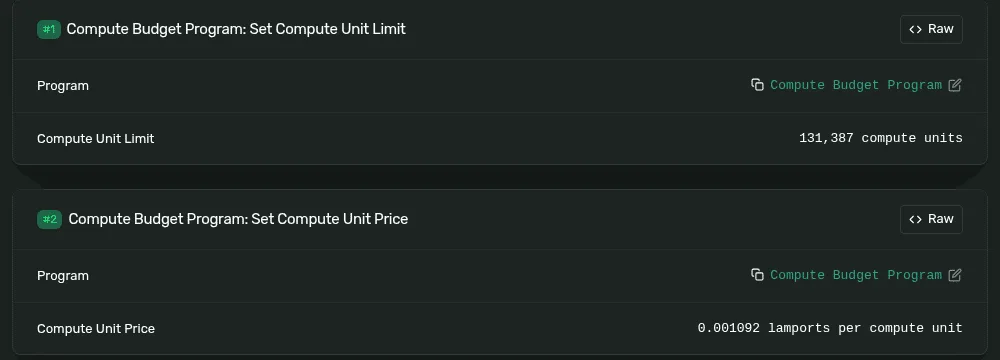
- First instruction: set the limit. It applies to the whole transaction.
- 131,387 units requested. The swap used 105,751, a comfortable margin without being wasteful.
- 1,092 micro-lamports per unit. Times the limit, that is 143.5 lamports of tip: the 144 Solscan reports.
Why the limit matters beyond the fee
Each block has a fixed compute budget (100 million CU in 2026, raised in steps over the years), and any single account can be written by at most 12 million CU per block. The scheduler packs transactions by their requested limit, not their actual use. A transaction that asks for far more than it needs is harder to fit, is ranked lower for the same tip, and crowds out others on the accounts it writes. Asking for what you use, plus a margin, is both cheaper and faster.
The fee market is local
Priority is contested per account, not network-wide. A hot mint during a launch has thousands of transactions trying to write the same bonding curve; an ordinary transfer at the same moment lands with no tip at all. Leaders order by tip per unit among the transactions competing for the same writable accounts. The RPC method getRecentPrioritizationFees returns what recently landed transactions paid, optionally filtered to the accounts you will touch; that, not a global number, is the right input.
| Quiet network, ordinary transfer | 0 micro-lamports. Median mainnet tip on a normal day is zero. |
|---|---|
| Contested DEX swap | Hundreds to a few thousand micro-lamports per unit: a fraction of a cent. |
| Launch snipe on a hot mint | The pump.fun buy in Bonding curves paid 150,000 lamports for 95,000 units, about 1.58 lamports per unit, more than a thousand times the swap's tip. |
Where the money goes
The base fee is split: half burned, half to the block's leader. The priority fee goes entirely to the leader (since early 2025; before that, half was burned too). Validators that share block revenue pass a portion of it to their stakers. That is the second commission in Staking.
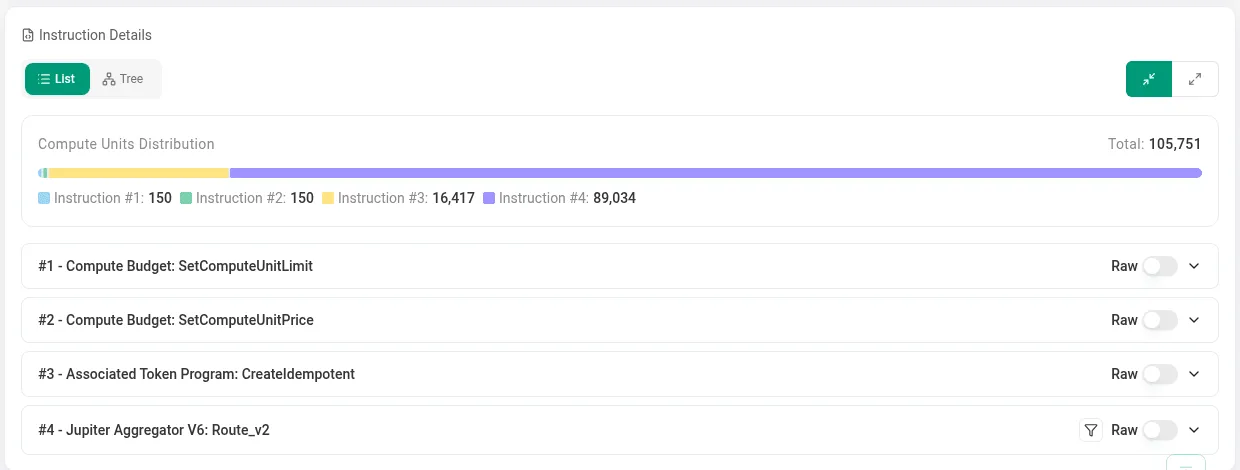
- How the units split across instructions. The two budget instructions cost 150 each; the swap took 89,034.
- The limit instruction. Solscan decodes the requested cap.
- The price instruction. Together they define the tip.
Failures you will see
Computational budget exceeded | The transaction ran out of units. Raise the limit, but first check the program isn't looping on bad input. |
|---|---|
Insufficient funds for fee | The wallet can't cover base fee plus tip. Tips are charged on the limit, so a huge limit with a high price can be surprisingly large. |
| Never lands, no error | The tip was too low for the contention on the accounts touched and the blockhash expired. Nothing charged. Raise the price, or wait. |
Transaction cost on Solscan | Not CU: a scheduler cost that also counts signatures and write locks. Only the CU line is your budget. |
The recipe
- Simulate the transaction against current state and read the units consumed.
- Set the limit to consumed × 1.1, rounded up. Never leave the default for multi-instruction transactions.
- Read recent prioritization fees for the accounts you write; pick a percentile that matches how urgent you are.
- Send, and resend the same signed transaction until it confirms or the blockhash expires. Resending never double-spends: the same signature can land once.
- If it expires, rebuild with a fresh blockhash and a higher price.
import { ComputeBudgetProgram } from "@solana/web3.js";

tx.add(
  ComputeBudgetProgram.setComputeUnitLimit({ units: 120_000 }),
  ComputeBudgetProgram.setComputeUnitPrice({ microLamports: 1_500 }),
  // ...the instructions that do the work
);
// tip = 120,000 × 1,500 µL = 180,000,000 µL = 180 lamports
Every Solstack tool simulates first and sets both instructions from the result, which is why its transactions show a tight limit and a small tip rather than the defaults.
What to remember
- Compute units meter work. Default 200k per instruction, 1.4M max per transaction; exceed it and the transaction fails.
- Tip = requested limit × price in micro-lamports. It is charged on the limit, so request what you use plus a margin.
- Priority is contested per account. Read recent fees for the accounts you touch, not a global number.
- Base fee: half burned, half to the leader. Priority fee: all to the leader.
- Simulate, set limit and price, resend until it lands or expires. Resending the same signature never double-spends.
Try it
What each tool does: Solana Transaction Inspector · Solana Network Status