Beginner· Lesson 6 of 8· 3 min
Reading a Solana explorer
Solscan and Solana Explorer are windows onto the same ledger. Learn the four kinds of page and you can check anything anyone tells you, without trusting them.
An explorer is a website that reads the chain through an RPC node and lays the raw accounts and transactions out as pages. It needs no wallet, changes nothing, and everything it shows is public. The two most used are Solscan and the official Solana Explorer; they show the same data with different emphasis, so switch when one is unclear.
Four kinds of page
| Account | Anything with an address: a wallet, a token account, a program, a stake account. The page adapts to what it finds. |
|---|---|
| Token | A mint address. Supply, decimals, authorities, holders and the metadata that gives it a name. |
| Transaction | A signature. Who signed, what ran, what changed, whether it succeeded. |
| Block | A slot number. Every transaction the leader put in that block. |
Paste anything into the search box and the explorer works out which it is. Names such as “Binance 2” or “Jupiter” are labels the explorer maintains, not something written on-chain, and a lookalike address will not carry them.
A wallet page
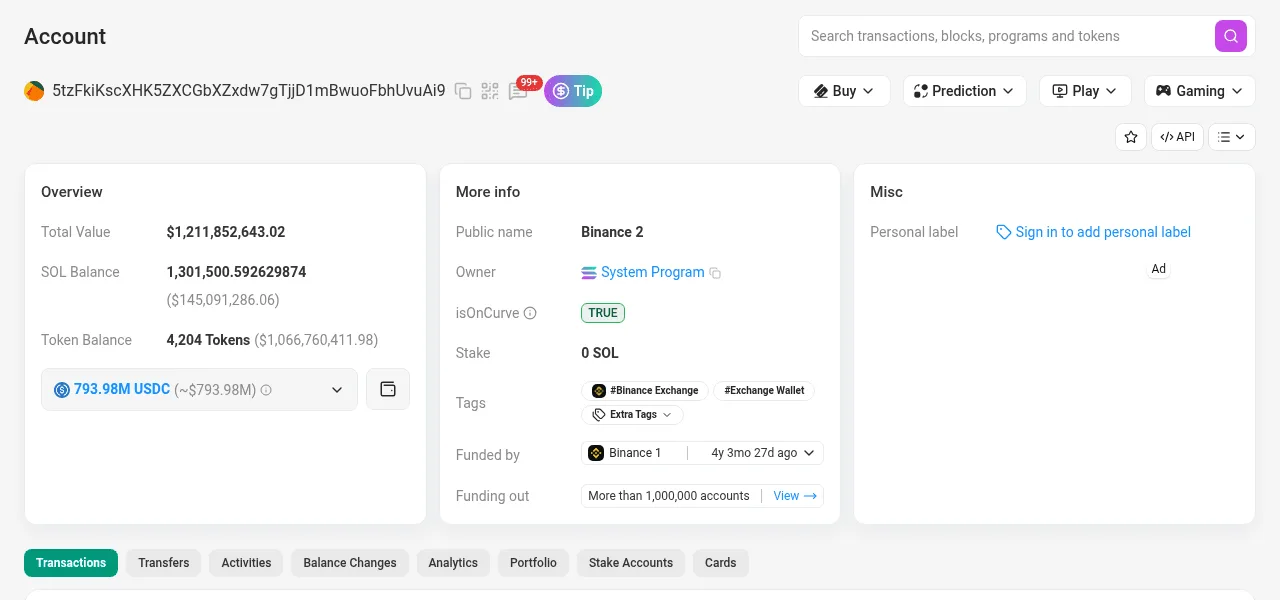
- The address. Everything below is derived from the account at this key.
- SOL balance: the account's lamports, shown in SOL.
- Token holdings. Each is a separate token account owned by this wallet, 4,204 of them here.
- Owner: the System Program. That is what makes this a wallet rather than a program's data.
- A public label. Assigned by the explorer, not the chain; treat it as a hint.
- The tabs split history by kind: transactions, transfers, stake accounts.
The owner field is the first thing to read on any account page. A wallet is owned by the System Program; a token balance by the Token program; a program's state by that program. If a page says “Token Account” or “Stake Account” at the top, the explorer has already decoded the data for you. The account model explains the fields.
A token page
The address at the top is the mint, the token's only real identity. Check decimals, supply and the two authorities before anything else, then the holder list: a single wallet holding most of the supply, or a handful of wallets created in the same minute, tells you more than the logo does. SPL tokens walks through a token page field by field.
A transaction page
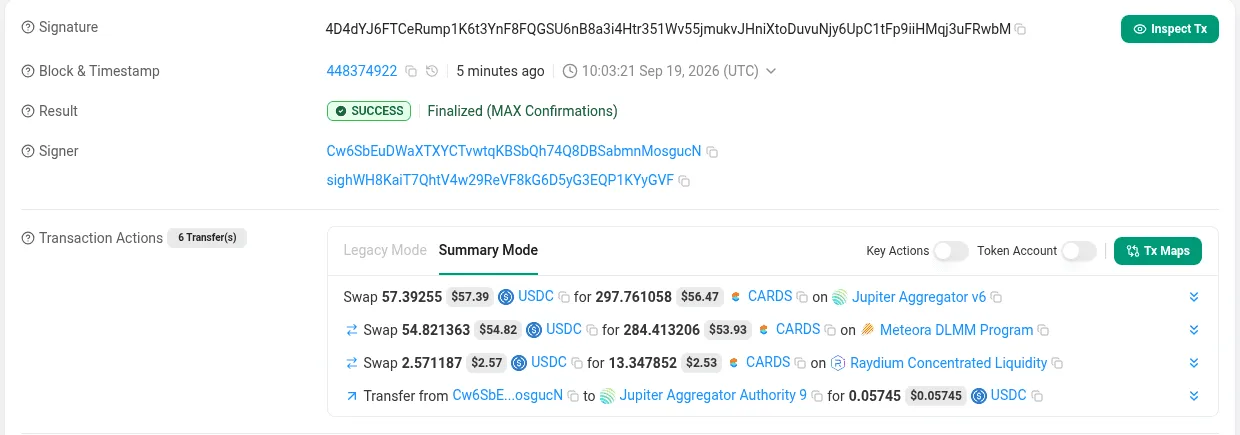
- The signature is the transaction's id. Anyone with it can open this page.
- The block it landed in and when. Age is measured from the block's timestamp.
- Result and confirmation level. “Finalized” means it can never be reversed.
- Who signed. The first signer paid the fee.
- What happened, in words. The explorer decoded the instructions and balance changes.
Scroll down for the instruction list, which is the transaction's real content, and the program logs. A failed transaction is still on-chain: its page shows the error and the log line just before it, which usually says why in plain words. Reading a transaction simulation lists the common ones.
Habits worth forming
- Verify a token by mint address, from the project's own site, then compare on two explorers. Names are copied; addresses are not.
- Before trusting a “locked” or “burned” claim, open the account it points to and read its owner.
- Use the cluster switch (top right) when looking at devnet. A devnet address pasted into a mainnet explorer just shows an empty account.
- Bookmark the explorer. A link in a message can lead to a copy of an explorer page with edited numbers.
Solstack's inspectors do these same reads with fewer clicks: Account Inspector decodes any account, Token Inspector runs the trust checks, Transaction Inspector decodes a signature.
What to remember
- Explorers read the ledger through an RPC node. No wallet, no writes, all public.
- Four page types: account, token, transaction, block. The search box works out which you pasted.
- The owner field tells you what an account is. Labels are the explorer's, not the chain's.
- A transaction page's instruction list is what ran; its logs say why something failed.
- Verify by mint address and account owner, never by name or logo.
Try it
What each tool does: Solana Account Inspector · Solana Transaction Inspector · Solana Token Inspector