Intermediate· Lesson 8 of 8· 3 min
Rent: reclaiming deposits and cleaning up
Every account you have ever created still holds a SOL deposit. Most of them are empty. Here is how the deposit is calculated, why it piles up, and how to get it back.
Validators keep every account in memory and on disk, so the network charges for storage: an account must hold at least a minimum balance for its size, the rent-exempt minimum. Below it, the account cannot be created. Above it, nothing is ever deducted. The deposit sits there for as long as the account exists and returns in full when it is closed.
The formula
The minimum is a rate per byte, times two years' worth, applied to the account's size plus a fixed 128-byte overhead. In 2026 that works out to 5,080 lamports per byte, so an empty account needs 650,240 lamports and a 165-byte token account needs 1,488,440. The rate was lowered in 2026; accounts created earlier still hold the larger deposit they were opened with, and return that larger amount when closed.
deposit = (128 + bytes) × 5,080 lamports

  wallet         (  0 B)  =   650,240  = 0.00065 SOL
  mint           ( 82 B)  = 1,066,800  = 0.00107 SOL
  token account  (165 B)  = 1,488,440  = 0.00149 SOL
  stake account  (200 B)  = 1,666,240  = 0.00167 SOL
  metadata       (679 B)  = 4,099,560  = 0.00410 SOL
Where it piles up
Every token you have ever received, swapped into or been airdropped left a token account behind, one per mint, and each one holds a deposit. Sell the token and the account stays, empty, still holding its SOL. Active wallets accumulate dozens; airdrop farmers accumulate hundreds. Old mints you created, NFTs you burned, and closed positions' leftovers all add up the same way.
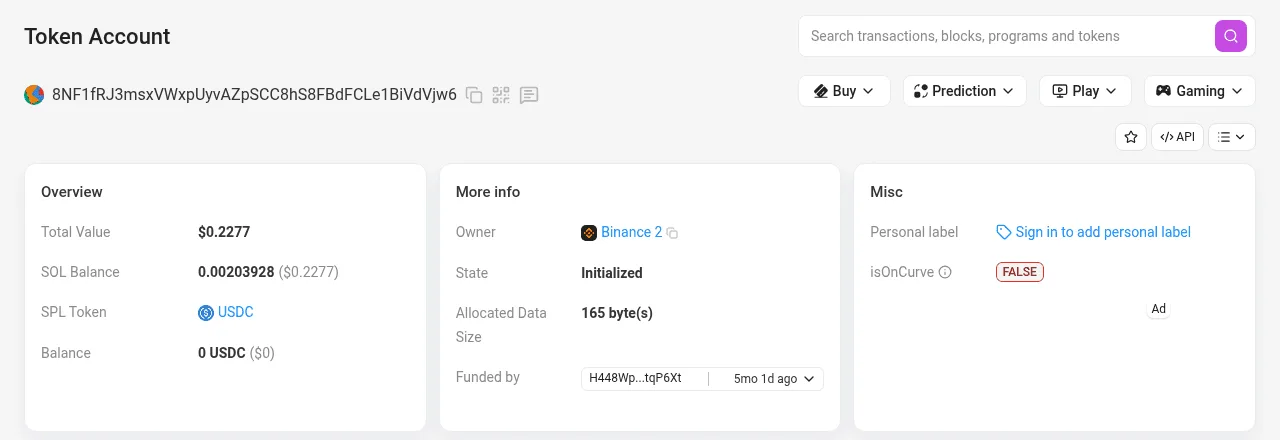
- Solscan recognised the account's owner program and layout: a token account.
- Its SOL balance is exactly the deposit, at the pre-2026 rate because it was created earlier. Closing returns all of it.
- Zero USDC. Nothing to move out first.
- The wallet that can close it: only the owner's signature releases the deposit.
- 165 bytes, the standard token account size.
- Not on the Ed25519 curve: this is an associated token account, a PDA.
Closing
The Token program's CloseAccount instruction deletes a token account and sends its lamports to a destination you choose. The rules:
- The balance must be zero. Dust has to be transferred or burned first. Token Burner does that in the same transaction as the close.
- The account's owner must sign. You cannot close someone else's account, even one you paid the deposit for.
- A Token-2022 account with withheld transfer fees must have them harvested first.
- A wrapped-SOL account closes back into plain SOL, which is how unwrapping works.
- A mint cannot be closed by the original Token program. Token-2022 allows it once supply is zero, if the mint was created with a close authority.
Closing is a normal signed transaction. The wallet's simulation shows SOL arriving and nothing leaving; if it shows anything else, stop.
Doing it in bulk
- Open Rent Reclaim. It scans the wallet for empty token accounts and totals their deposits.
- Review the list. Keep accounts for tokens you expect to receive again; a closed account is recreated at the recipient's cost next time.
- Sign one transaction per batch of closes. Each returns its deposits to the wallet.
- For accounts holding dust, use Wallet Cleaner, which burns the remainder and closes in one go.
What you cannot get back
Deposits in accounts you don't own: the token accounts you created for airdrop recipients belong to them. Deposits in program-owned state you have no authority over. And, for a plain SPL mint, the mint's own deposit, 0.001 SOL locked forever, which is why Token-2022's close authority exists. Rent on Solana has the edge cases.
Video
What to remember
- Rent is a minimum balance based on the account's size. It comes back when the account closes.
- deposit = (128 + bytes) × 5,080 lamports at the 2026 rate; older accounts hold more and return more.
- Every token you ever held left a token account behind, each with a deposit.
- Close needs a zero balance and the owner's signature. Burn dust first.
- You can only reclaim accounts you own. Recipients own the accounts you created for them.
Try it
What each tool does: Reclaim Solana Rent · Solana Wallet Cleaner · Solana Token Burner